
Phtaya App Guide Philippines: Games, Mobile Access and Practical Use
Phtaya is one of the mobile gaming options we introduce in the PH444 catalogue for Filipino users who want slots, live casino, sports and poker-style play in one place. We present it as a separate product and focus on the parts a real user needs to understand before starting: where to enter, which game section to choose, what to check on mobile, and how to review payment or promotion details. Our approach is practical and mobile-first. Bago ka mag-start, the goal is to make each step clear so you can move through the app with less confusion and better control over your session.
Why We Include This Mobile Gaming Option
We include this product because it brings several major game categories into one mobile-oriented product. For Filipino users, that means one session can begin with slots, move to live casino, switch to sports, or end with poker-style play depending on time and preference.
| Area | What to check before starting |
| Slots | Stake, paytable, bonus mechanics |
| Live casino | Table limits, round status, betting window |
| Sports | Event status, market, odds, settlement |
| Poker | Room rules, stake level, format |
| Android/iPhone | Current access route and setup steps |
| Payments | Active PHP method and transaction details |
| Promotions | Eligibility, turnover and validity |
We keep the focus on visible functions and current user actions. If a detail such as app version, file size, license number, rating, download count or withdrawal speed is not clearly established, we leave it out rather than fill the gap.
Phtaya App Navigation: Start With the Lobby
The first thing we recommend is learning the main lobby before opening a promotion or payment page. Madali itong gawin, and it helps you understand how the product is organized.
A simple first-use flow is:
- Open the current access route.
- Enter the main lobby.
- Check the visible game categories.
- Choose one category you already understand.
- Open the game information before starting.
- Return to the lobby when you want to switch.
Slots: Check the Game Before Repeated Spins
Phtaya slots are the easiest place to begin if you want a short session. The basic interaction is simple, but each title can still use different stake levels, symbols, bonus rules and autoplay settings.
Before your first spin, check:
- The current stake
- Minimum and maximum bet
- Paytable
- Bonus or free-spin rules
- Autoplay controls
- Any game-specific information shown on screen
A short session can follow this pattern: choose one game, set a budget, keep the stake stable, review the balance after several rounds, then stop when you reach the limit you set.
Live Casino: Read the Table Before Joining
For users who prefer dealer-led play, the live casino section gives a slower and more structured experience. The key is to check the table before entering a round.
Look at:
- Table limit
- Current round status
- Betting countdown
- Available wager types
- Side bets if shown
- Settlement display
If the game is new to you, watch a few rounds first. Mas okay na maintindihan mo muna ang flow kaysa magmadali sa first bet.
Sports: Choose the Market Carefully
Sports can feel familiar because many Filipino users already follow basketball, football, boxing or other events. The important part is the market, not only the team or league name.
Before confirming a sports selection:
- Choose the sport.
- Find the event.
- Check whether it is upcoming or live.
- Open the market list.
- Read the exact market name.
- Check the current odds.
- Review settlement details if shown.
- Confirm the selection only after checking it again.
For new users, one familiar market is enough. Keeping the selection simple makes it easier to understand how the result is settled.
Poker: Check the Room Rules First
Poker-style play needs more attention to format and room rules. A familiar name does not always mean every table works exactly the same way.
Before joining a room, check:
- Game type
- Table or room stake
- Number of players
- Action timer
- Entry requirement if shown
- Settlement method
Kung sanay ka na sa poker, the interface will feel familiar. Still, checking the room details first helps you avoid choosing a stake or format that does not match the session you planned.

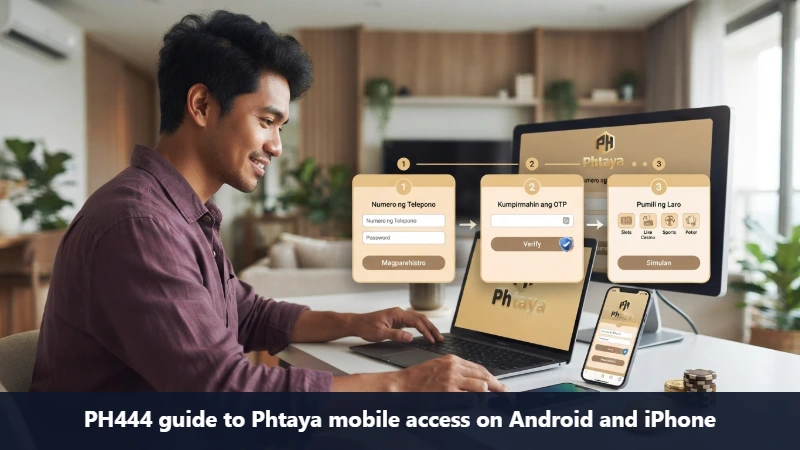
Mobile Access on Android
For Android users, the practical goal is simple: use the current route, verify the product identity, complete the setup, and keep your existing browser access available until the app opens correctly.
A clean Android flow is:
- Open the current access page.
- Choose the Android option.
- Check that the page clearly identifies the product.
- Start the download.
- Wait until the file completes.
- Review Android installation prompts.
- Open the app after setup.
- Return to the main lobby and check the categories.
Before installing, review available storage, the file source and any permissions requested by the device. Keep device protection active during the process. If Android shows an unexpected warning, verify the source and file again before continuing.
Browser Access Is Useful for Occasional Use
If you only open the product from time to time, browser access may be enough. Walang extra app file to manage, and it is easier to return directly to the lobby.
The main thing to watch is what happens when you switch to another app, especially a wallet. Some phones reload the browser tab. When that happens, return to the transaction page and check the current status before repeating any action.
iPhone Access: Follow the Current Mobile Route
For iPhone users, the process may use Safari or another mobile route shown by the product. The important step is to follow the current instructions on screen and review each device prompt before approving it.
Use this flow:
- Open the current access page in Safari.
- Choose the iPhone or iOS option.
- Follow the steps shown on screen.
- Review any profile, shortcut or device prompt.
- Open the product after setup.
- Check the main lobby before starting a game.
Kung may profile or shortcut step, basahin muna kung ano ang hinihingi ng device. This keeps the setup clear and helps you understand what is being added to the phone.
PHP Payments: Check the Live Cashier Before Every Transaction
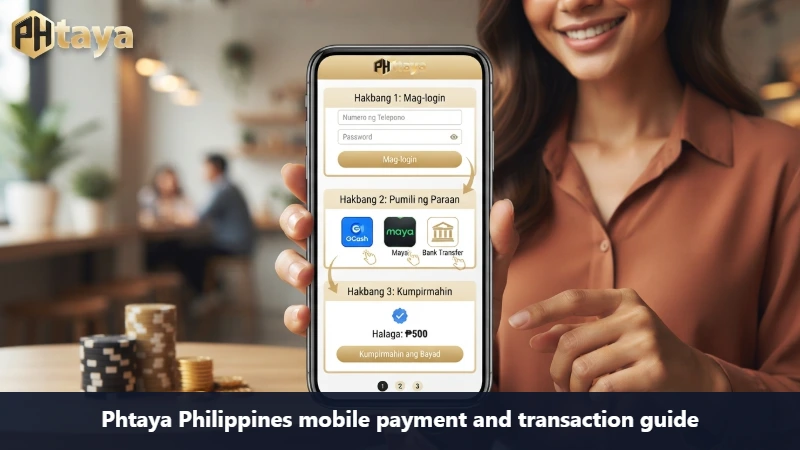
For Filipino users, payments are one of the most important practical parts of the mobile experience. We recommend checking the current cashier every time because the available PHP methods, receiving details and limits can change.
Before You Deposit
Use this step-by-step process:
- Open the cashier.
- Choose the PHP payment method shown.
- Check the minimum and maximum displayed.
- Review the receiving details.
- Enter the amount carefully.
- Complete the wallet or bank step.
- Return to the cashier.
- Check the transaction status.
Ingat sa payment details. Always compare the current receiving information with the transaction you are making instead of relying on an old screenshot.
After sending a payment, keep the amount, time, reference number and wallet or bank status. If the transaction already appears as completed on the payment side, check the gaming-side history before starting another request.
When a Withdrawal Is Pending
Keep:
- Requested amount
- Payment method
- Reference number
- Request time
- Current status
If support is needed, these details are useful. Keep passwords, OTPs, PINs and full wallet credentials private.
We also treat the app as a separate product from our publishing site. Being listed in our catalogue does not by itself establish a shared wallet, shared account or shared technical system, so users should follow the account and payment flow shown inside the product they are using.
Promotions: Check the Conditions Before You Claim
Phtaya product material presents promotional offers, so the practical step is to read the conditions before changing your deposit or game choice.
Check:
- Eligibility
- Required deposit if any
- Eligible games
- Turnover requirement
- Promotion period
- Claim method
- Withdrawal conditions
Mas practical ang promo kapag bagay talaga sa game na gusto mong laruin. We recommend choosing the game first, then checking whether an active offer applies.
This keeps the promotion as an extra benefit rather than the main reason to increase spending or extend the session.
What We Like About the Mobile Experience
From our perspective, the strongest part of the product is the way it brings several major categories into one mobile-focused product. Users can choose a quick slot session, a structured live table, an event-based sports market or a poker room without treating every session the same way.
What stands out for Filipino users is the practical flexibility:
- Mobile access on Android and iPhone
- Browser use for occasional sessions
- Slots for quick play
- Live casino for structured rounds
- Sports for event-based users
- Poker for users who prefer table strategy
- PHP-oriented payment flow
- Promotion details that can be checked before claiming
The app works best when the user starts with a familiar category and keeps the session simple.
A Practical Routine for Filipino Users
If you want a clean way to use the product from start to finish, we suggest this routine:
- Open the current access route.
- Check the main lobby.
- Choose one familiar category.
- Read the game information.
- Set a session budget.
- Start with one game.
- Review balance and activity during the session.
- Check payment details before any transaction.
- Review promotion terms before claiming.
- Return to the lobby when switching categories.
- End the session when you reach the limit you set.
Madali itong sundan because each step has one purpose. You avoid mixing game selection, payments and promotions at the same time.
Frequently Asked Questions
What is this app on PH444?
Phtaya is one of the mobile gaming options we introduce in our PH444 catalogue for Filipino users. The product presents slots, live casino, sports and poker-style categories.
What should I open first in the app?
Start with the main lobby. Choose one category you already understand, then check the game information before starting.
Can I use the app on Android?
Android access is presented as part of the mobile experience. Use the current Android route, review the file source and follow the device prompts during setup.
Is the app available on iPhone?
Yes, iPhone access is also presented. Open the current mobile route in Safari and follow the steps shown on your device.
What should I check before making a PHP payment?
Review the active payment method, current amount limits, receiving details, reference number and transaction status before and after sending money.
How should I choose a promotion?
Choose the game first, then check whether the promotion applies. Review eligibility, turnover, validity and withdrawal conditions before claiming.
Which category is easiest for a short session?
Slots are usually the simplest choice for a short session because each round finishes quickly. Live casino, sports and poker can suit users who want a more structured or event-based experience.
Conclusion
Phtaya gives Filipino users a practical mobile-first mix of slots, live casino, sports and poker-style play. At PH444, we introduce it for users who want several game categories in one place and prefer a clear flow on Android, iPhone or browser.
The best way to use the app is straightforward: begin with the lobby, choose one familiar category, check the game details, follow the current PHP payment instructions and review promotion terms before claiming. Bago ka mag-start, set a clear session budget and keep each step simple. That makes the experience easier to follow from access and gameplay to payments and promotions.